Advanced Screen Recording Techniques
Taking a live voice narration to voiceover
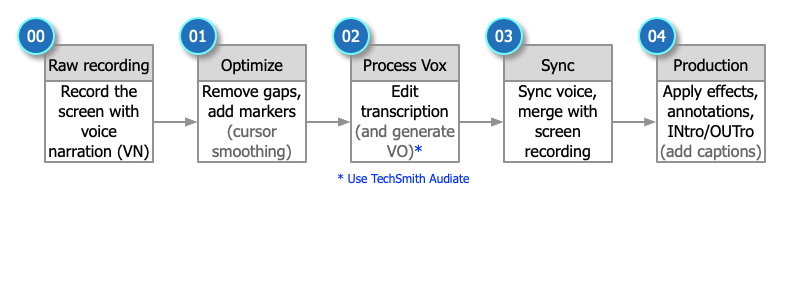
Upwork clients want to make their own recording with their own voice and have it turned into a professional tutorial or demo video. This is only possible with the use of TechSmith Camtasia and Audiate, The video on the left shows an excerpt of a live recording. In Camtasia, basic effects and annotations can be easily applied, but the real power is the use of Audiate. The original live voice narration audio is transcribed to text and unnecessary pauses and mistakes can be removed. An AI voiceover artist can be selected from many available and the text script used to produce a professional voiceover.
To perform this type of tutorial production, the process is quite a bit different than traditional script-based approaches.
Original: Live voice narration
(720p, screen recording, voice narration using integrated laptop mic, and no webcam)
Voiceover polished result: Transcribed audio using AI voiceover (voiceover artist: Andrew) with INtro/OUTro, lower third headings, and basic effects
(720p, screen recording, voice narration, and no webcam)
Optimized duration is reduced (under your control)
Tools used: TechSmith Camtasia, TechSmith Audiate, TechSmith Snagit, Adobe Photoshop
Fine tunings of the script and enhancements applied to the voiceover track are then returned back to Camtasia, still synced to the screen recording. Surprisingly, the pace was quickened so that the original 3-minute video has been dramatically reduce to just under 2 minutes as shown in the right.
Taking Screen Recordings to Polished Video
There is some magic at play when a screen recording (app, browser, PowerPoint slides, …) is transformed to a professional video result.
Usually, the initial recording includes one or two tracks: video, webcam, and live voice narration (L). In PowerPoint, Camtasia marks where each slide begins on the timeline.
Once you add basic effects, a branded INtro/OUTro, highlights, panning, transcript-to-voiceover audio, and even captions (optional), additional tracks are added (R).

With an upcoming course, QUICK START: Creating Digital Art with SketchBook Pro (first quarter of 2027), you can see the result of:
Voice narration (no gaps, no mistakes, highest quality)
PowerPoint slides
App recording (zoom, pan, callouts, …)
View the end result here.
Tools used: TechSmith Camtasia, TechSmith Audiate, Microsoft PowerPoint